
Audit Report for Upcoming MFA Requirements
If you’re a Salesforce admin or architect right now, your inbox has been busy. Salesforce has been signaling for months that 2026 is the year enforcement stops being theoretical. Three distinct security requirements are now actively rolling out — and if you haven’t already built the reports to audit your org’s compliance against each one, this post is your starting point.
We’ll cover what each requirement demands, which Salesforce reporting tools address it, and — critically — where the standard Identity Verification Methods report type hits a wall for SSO users.
The Three Requirements You Need to Know
Requirement 1: MFA for All Employee Users
📄 Prepare for MFA Enforcement for All Employee Users
This is the broad baseline. Salesforce is enforcing multi-factor authentication for all internal users — both direct UI logins and SSO logins — across production and sandbox orgs. The enforcement window began in sandboxes on June 22, 2026 and rolls into production starting July 20, 2026.
Who’s in scope: Any user with a standard Salesforce license who logs in via the UI. This includes internal users accessing Employee Communities or Experience Cloud sites. External users with Experience Cloud licenses, Chatter External, and Chatter Free users are excluded.
The exemption you need to audit: The “Waive Multi-Factor Authentication for Exempt Users” permission (API field: PermissionsBypassMFAForUILogins) is being effectively retired. After enforcement, users with this permission will be prompted to enroll in MFA anyway. If you have legitimate automated testing tools using this exemption, you must proactively contact Salesforce Support to preserve it — it is no longer self-service.
What “compliant” looks like for SSO users: Salesforce considers an SSO login compliant if the Identity Provider passes a valid AMR (Authentication Methods Reference) or ACR (Authentication Context Class Reference) signal in the ID token or SAML response. SSO alone, without a qualifying signal, does not satisfy the requirement.
Requirement 2: Phishing-Resistant MFA for Privileged Users and Admins
📄 Prepare for Phishing-Resistant MFA Enforcement for Privileged Users including Admins
This is the higher bar — and the one most likely to disrupt your org if you haven’t prepared. Salesforce is requiring phishing-resistant MFA for any user with the System Administrator profile or any of these permissions: Modify All Data, View All Data, Customize Application, or Author Apex.
Enforcement dates: Sandboxes starting June 22, 2026; Production starting July 1, 2026 (earlier than the standard MFA production date).
What counts as phishing-resistant: Only WebAuthn/FIDO2-based methods qualify. Salesforce groups these into three categories:
- Built-in authenticators (platform passkeys): Device-bound biometric or PIN methods — Touch ID, Face ID, Windows Hello. These are registered to the specific device and cannot be phished because the cryptographic operation is tied to the real login domain.
- Physical security keys: Hardware tokens like YubiKey, Google Titan, or any FIDO2-compliant USB/NFC key. A strong choice for users who share workstations or want a method independent of their device’s biometric hardware.
- Passkeys stored in a password manager: FIDO2-compliant passkeys synced through a credential manager such as Bitwarden, NordPass, 1Password, or iCloud Keychain. These are roaming passkeys — not device-bound — but they still satisfy the phishing-resistant bar because the WebAuthn assertion is scoped to the verified origin. This is increasingly the most practical path for organizations that already have a password manager in wide deployment.
TOTP apps — including Salesforce Authenticator in push/TOTP mode, Google Authenticator, and Microsoft Authenticator — and push notifications do not satisfy this requirement for privileged users, even if they worked fine before. The distinction matters: TOTP codes can be intercepted in real time by adversary-in-the-middle attacks; WebAuthn methods cannot.
SSO note for privileged users: If your privileged users log in via SSO, the IdP must pass a phishing-resistant AMR/ACR signal specifically. A standard MFA signal is not sufficient for this tier. If your IdP can’t send the right signal, those users will be prompted to register a Salesforce phishing-resistant method on next login — which means planning ahead or dealing with admin lockouts.
Requirement 3: Step-Up Authentication for Report Exports
📄 Prepare for the Upcoming Step-Up Authentication Requirements on Report Actions
This one is different in character from the first two. It’s not about who can log in — it’s about protecting data exfiltration via report exports. Salesforce is implementing a mandatory, time-based step-up MFA challenge that fires whenever a user exports a report, if a configurable amount of time has elapsed since their last step-up event. This one has been walked back from the original plans after huge backlash from the community raised concerns of how awful the user experience would have been to have to verify periodically just to view reports and dashboards. This may surface again in the future, but for now the UX impact is minimal.
Key details:
- Applies to report exports only, not to viewing or running reports in the UI (this scope was narrowed via a change log update in June 2026)
- The cooldown window is configurable between 1 and 120 minutes in Identity Verification settings
- All users are in scope, including SSO users — there are no exemptions for login method here
- SSO users without a registered Salesforce MFA method will be challenged via email or SMS OTP as a fallback (not ideal from a security standpoint, but better than no challenge)
- The framework fails closed: if the MFA service is unavailable, the export is blocked
The IP restriction bypass: There is one alternative path. If a user’s Profile has Login IP restrictions configured and their IP hasn’t changed between login and export (or “Enforce login IP ranges on every request” is active), step-up authentication is not required. This is worth knowing before users start calling the help desk.
Audit Reporting: Where to Start
The Identity Verification Methods Report
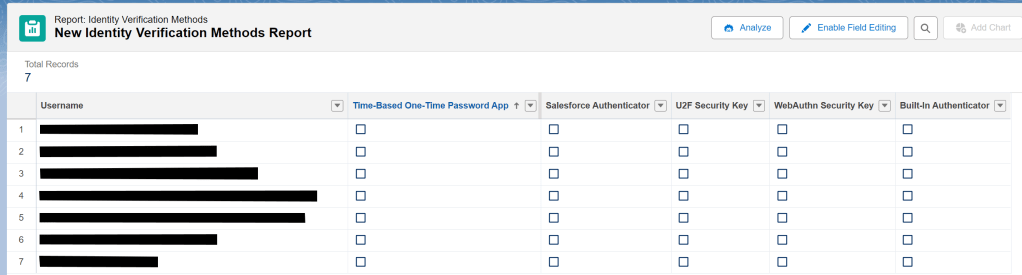
Salesforce provides a built-in report type called “Identity Verification Methods“.
What this report shows you:
- Which users have registered any MFA method
- The specific type of method registered (Authenticator App, Built-In Authenticator, Security Key, etc.)
- Whether a user has zero registered methods — your highest-risk population
How to find it: From Reports, create a new report → search for “Identity Verification” in the Report Types list.

For Requirement 1: Identify Users with No MFA Method Registered
Add a filter for users where no verification method type is populated. Cross-reference this against active users with standard licenses. This gives you the list of users who will face a hard enrollment prompt (or worse, a login block if they have no fallback) when enforcement hits their org.
For Requirement 2: Identify Privileged Users and Audit Their Method Type
The Identity Verification Methods report becomes especially important here, but you need to layer in privilege. Your audit process should be:
- Identify privileged users — Use the User Access and Permissions Assistant (available as an installable app from Salesforce Labs) or SOQL against PermissionSetAssignment and Profile to find everyone with System Admin profile, Modify All Data, View All Data, Customize Application, or Author Apex.
- Cross-reference against registered method types — From the Identity Verification Methods report, filter down to those privileged users and examine the method type column. Anyone with only an Authenticator App (TOTP) registered and no Built-In Authenticator or Security Key is non-compliant for this tier.
- Identify users with zero methods — These privileged users will be blocked from logging into your org the moment enforcement hits their wave.
For Requirement 3: Identify Users Without Any Registered Method or Email/Phone Fallback
Since step-up auth applies to all users exporting reports, your audit here is different. You’re looking for:
- Users with no registered Salesforce MFA method and no verified email or phone number on file (these users would have no path to complete the step-up challenge and would be blocked from exporting)
- Review the configured step-up cooldown period in Identity Verification settings to ensure it aligns with your org’s data sensitivity
A report combining the Identity Verification Methods data with User email/phone fields gives you the gap list.
The SSO Gap: What the Standard Report Can’t Tell You
Here’s the important caveat you need to understand before relying solely on the Identity Verification Methods report.
The report reflects Salesforce-registered methods only. It cannot see or report on what your Identity Provider is doing.
For SSO users, Salesforce compliance depends entirely on whether the IdP is:
- Enforcing MFA at the IdP level
- Passing the correct AMR/ACR signal values in the SAML assertion or OIDC ID token
An SSO user can appear in your Identity Verification Methods report with zero registered Salesforce methods and still be compliant — if their IdP is passing the right signals. Conversely, an SSO user could have a Salesforce Authenticator registered but still be flagged as non-compliant at the privileged tier if their IdP only sends a standard-MFA signal when a phishing-resistant one is required.
The right audit approach for SSO users:
- For Requirement 1 (standard MFA): Work with your SSO/identity team to confirm the IdP is enforcing MFA for all users and passing AMR or ACR values that Salesforce recognizes as standard tier. Salesforce documents the full accepted signal value tables in the requirement article.
- For Requirement 2 (phishing-resistant): Confirm the IdP is enforcing a WebAuthn/FIDO2 method specifically for privileged users and is passing the corresponding phishing-resistant AMR/ACR signal. This often means a dedicated policy in Okta, Entra ID, or Ping for your admin population.
- For Requirement 3 (step-up): Ensure SSO users have a registered Salesforce method or a valid email/phone as fallback, since step-up is always a Salesforce-side challenge regardless of how the user originally authenticated.
There is no native Salesforce report that will show you what signals your IdP is sending. You’ll need to pull that from your IdP’s logs or use a test login with browser developer tools to inspect the SAML/OIDC payload. Salesforce’s own documentation notes you can verify what your IdP is asserting directly from your browser during a test login without requiring IdP admin console access.
The practical recommendation: Don’t treat “SSO = covered.” Build a specific checklist item in your MFA compliance audit that involves your identity team confirming IdP signal configuration, separate from anything the Salesforce reports tell you.
Summary: Your Audit Report Stack
| Requirement | Primary Report | Supplemental SOQL / Tool | SSO Caveat |
|---|---|---|---|
| MFA for All Users (005321561) | Identity Verification Methods — filter: no method registered | PermissionSetAssignment + Profile SOQL for Bypass MFA permission | IdP must pass AMR/ACR signal; report won’t confirm |
| Phishing-Resistant MFA for Privileged Users (005321563) | Identity Verification Methods — filter: privileged users with only TOTP method | User Access & Permissions Assistant to identify privileged users | IdP must pass phishing-resistant signal specifically |
| Step-Up Auth for Report Exports (005321566) | Identity Verification Methods — filter: no method AND no email/phone | Review step-up cooldown setting in Setup | SSO users challenged via Salesforce email/SMS fallback; ensure contact info is current |
What to Do Right Now
- Run the Identity Verification Methods report today and count users with zero registered methods. That number is your baseline risk.
- Pull your privileged user list and cross-reference against registered method types. Any admin with only a TOTP method needs to register a passkey before July 1 (production).
- Audit the MFA Bypass permission and proactively contact Salesforce Support for any legitimate automated testing exemptions before enforcement locks you out of that option.
- Contact your identity team for SSO orgs and validate that AMR/ACR signal configuration is in place — this is outside the Salesforce report boundary entirely.
- Check user contact info for the step-up export requirement: SSO users without a registered Salesforce method need a valid email or phone number to receive the OTP fallback.
Enforcement is no longer a future event — for sandboxes it has already begun. The reports are your fastest path to knowing exactly where you stand.

Aaron Crear View All
Aaron is a Salesforce MVP and Founder of Hat-Trick Consulting. He works with companies around the world to help them achieve their Salesforce goals through administration, development and architectural services. A former sales director, Mr. Crear has extensive functional and technical expertise translating business requirements to technical solutions. Aaron currently holds 10 Salesforce certifications including Salesforce Certified Data Architect, Sharing & Visibility Architect, Sales Cloud Consultant, Service Cloud Consultant, Community Cloud Consultant, Platform App Builder, User Experience Designer, Advanced Administrator, Administrator and AI Associate.
He is also the leader of the Lowell, MA Admins Community Group and is a co-organizer of Northeast Dreamin’. Mr. Crear is a frequent speaker, having presented at Dreamforce, Albania Dreamin', Big Sky Dreamin’, Cairo Dreamin', Czech Dreamin’, dreamOle’, Dubai Dreamin', Florida Dreamin', French Touch Dreamin’, London's Calling, Midwest Dreamin’, North Africa Dreamin', Phillyforce, Polish Dreamin', Portugal Dreamin', Snowforce, Southeast Dreamin’, True North Dreamin, YearLeadin’and Salesforce World Tours.

